
Technology
BadSeed Tech Carpio: The Innovative Wrist Rest Transforming Gaming and Desk Comfort

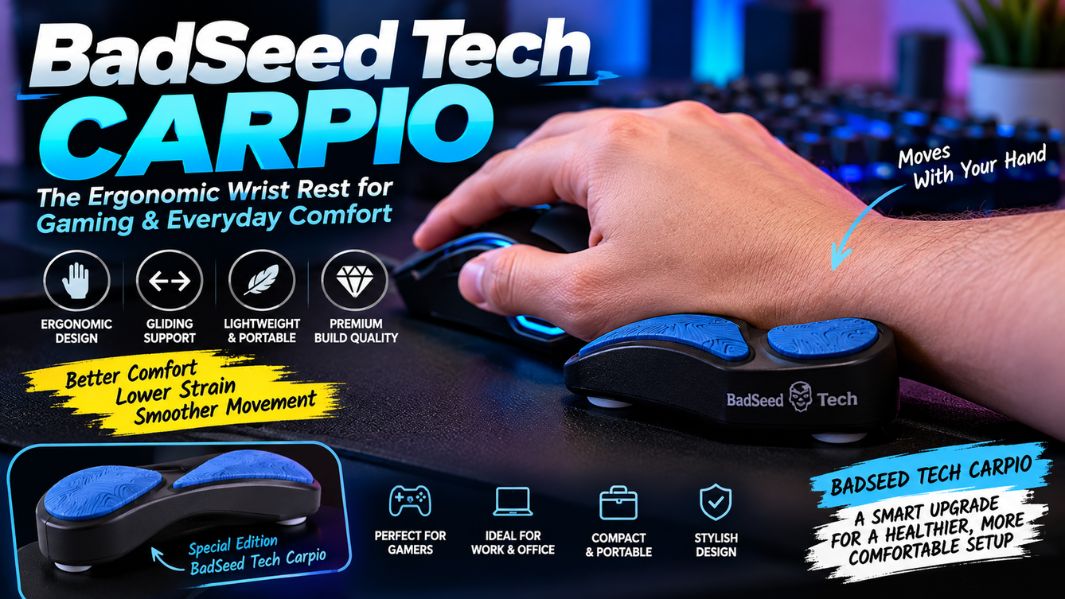
Spending long hours on a computer or in competitive gaming can put considerable strain on the hands and wrists. Whether you’re editing videos, managing spreadsheets, designing graphics, or playing demanding games, a comfortable desk setup becomes increasingly important. This growing awareness of ergonomic technology has brought attention to innovative accessories such as BadSeed Tech Carpio, a compact wrist support designed to move naturally alongside the user’s hand.
Unlike traditional wrist rests that stay stationary, this accessory uses a gliding mechanism to encourage more natural movement while using a computer mouse. Developed by DeltaHub and presented in collaboration with technology creator BadSeed Tech, the product combines practical ergonomics with a distinctive look. Its thoughtful construction, lightweight materials, and simple functionality make it an interesting option for people seeking greater comfort during extended computer sessions.
This article explores the BadSeed Tech Carpio’s design, materials, ergonomic principles, everyday benefits, limitations, and practical considerations to help readers understand whether this accessory suits their workspace.
What Is BadSeed Tech Carpio?
BadSeed Tech Carpio is a special-edition ergonomic wrist rest based on DeltaHub’s Carpio 2.0. DeltaHub, a company specializing in ergonomic workspace accessories, collaborated with BadSeed Tech, a technology-focused content creator known for reviewing computer hardware, gaming peripherals, and desk equipment, to create the product.
The collaboration edition features a black Carpio 2.0 body and exclusive BadSeed Tech pads, including a distinctive blue design. Although its appearance differs from the standard product, it uses the same underlying Carpio 2.0 platform. The accessory supports selected areas of the palm while allowing the hand to move over the desk. It is a physical, mechanical device rather than electronic equipment, so it doesn’t require charging, computer software, wireless connectivity, or complicated installation. Its central purpose is to provide moving palm support during computer use without fixing the hand in one position.
The Story Behind the DeltaHub and BadSeed Tech Collaboration
The partnership connects product engineering with the online technology community. BadSeed Tech has developed an audience interested in carefully selected computer accessories, practical hardware improvements, and attractive workspace arrangements. Meanwhile, DeltaHub has focused on designing accessories that address common challenges of prolonged desk work.
The collaboration brings these interests together through an existing ergonomic product with an exclusive visual identity. Rather than introducing an entirely new invention, the BadSeed Tech edition offers a distinctive variation of the Carpio 2.0. This distinction matters because consumers should understand that the special edition’s main differences involve its presentation and replaceable pads, not a fundamentally different support mechanism. For someone building a coordinated gaming setup, the appearance may appeal, while another buyer might find the standard version equally suitable from a functional perspective.
How Does the BadSeed Tech Carpio Work?
The Carpio’s most distinctive feature is its gliding support system. Conventional foam or gel wrist rests normally remain fixed on the desk while the user’s hand moves independently. This arrangement can provide cushioning, but it may also encourage movement around a relatively stationary contact point.
The Carpio approaches the problem differently. Its underside features low-friction PTFE feet, a material commonly used in applications requiring smooth sliding surfaces. When the user moves a mouse, the support can travel across the desk alongside the palm. This design encourages movement through the hand and forearm rather than concentrating every adjustment at the wrist.
The product’s shape also distributes contact across selected portions of the palm instead of placing sustained pressure directly on the sensitive central wrist area. However, comfort depends on individual anatomy, mouse position, working habits, and desk height. The gliding mechanism is a practical design feature, but its presence alone does not establish that the product prevents repetitive strain injuries or treats an existing medical condition.
Design, Materials, and Build Quality
One reason the accessory stands out is its compact design. The Carpio 2.0 combines an ABS plastic base, soft silicone contact pads, and PTFE gliding feet. Each component contributes to a different part of the experience. The plastic base provides structure, the silicone pads create a relatively soft contact surface for the palm, and the feet help the device move across compatible work surfaces.
The BadSeed Tech edition adds exclusive replacement pads to the black Carpio body. According to DeltaHub’s product information, the special edition includes standard pads as well as its collaboration-specific pads. This interchangeable setup gives users flexibility in appearance without requiring them to buy an entirely different stand.
Its lightweight construction also makes the device portable. Unlike large keyboard rests that take up significant desk space, the Carpio fits in a laptop bag or accessory pouch. This makes it relevant for people who regularly alternate between home offices, shared workspaces, and other computer environments.
Why Ergonomics Matters for Computer Users
Ergonomics involves arranging equipment, movement, and working conditions around the human body’s needs. In computer environments, this includes monitor positioning, chair height, desk arrangement, mouse placement, and the angles maintained by the wrists and forearms.
Problems can develop when users repeatedly bend their wrists, reach too far for a mouse, or maintain an uncomfortable posture for extended periods. Even relatively small positioning problems may become noticeable after several hours. For this reason, neutral wrist alignment and comfortable movement are important principles in workstation design.
A moving palm support may help some users maintain a more comfortable relationship between their mouse and supporting hand. Nevertheless, it should be considered one part of a broader ergonomic arrangement. A carefully selected accessory cannot fully compensate for an unsuitable chair, excessive reaching, poor desk height, or a lack of movement breaks. Maintaining comfort generally requires attention to the complete working environment rather than relying on a single product.
Key Benefits of the BadSeed Tech Carpio
The product’s potential advantages come primarily from its combination of support, mobility, and compactness. For users who dislike the restrictive feeling of a stationary wrist pad, the gliding mechanism offers an alternative that moves with the hand. Its contoured contact surfaces also reduce direct pressure on the central wrist area.
Another attraction is its simple operation. It requires no batteries, drivers, or configuration. Once positioned correctly, the support works mechanically with ordinary mouse movements. This makes it accessible to people who prefer straightforward desk accessories over complicated equipment.
The replaceable pads and compact design add practical value. Users can swap the contact pads, transport the accessory between locations, and integrate it into different workstation setups. However, these advantages are design characteristics, not guaranteed improvements in physical health or productivity. Individual experiences can vary considerably, especially when mouse grip, workspace dimensions, and daily movement patterns differ.
BadSeed Tech Carpio vs Traditional Wrist Rests
The clearest difference between Carpio and an ordinary wrist rest is how each responds to movement. Traditional wrist supports are usually stationary cushions placed beside a keyboard or mouse. They may provide comfortable padding, especially during pauses, but they typically don’t move with the hand.
The Carpio uses a dynamic support design, letting the user move the support surface with the mouse hand. This distinction may matter for tasks that require repeated cursor adjustments, such as graphic design, editing, and general computer navigation.
However, a gliding accessory isn’t automatically better for every user. Some people prefer stationary support, while others work comfortably without any wrist rest. Products may also differ between those designed for typical mouse movement and specialized gaming accessories built for rapid, forceful movements. The right support depends on the activity and individual preferences, not appearance alone.
Who Should Consider Using BadSeed Tech Carpio?
The accessory may interest several categories of computer users. Office professionals who regularly navigate documents, reports, and browser applications might appreciate its compact profile. Designers and video editors often make repetitive mouse movements, so comfortable hand positioning matters. Programmers and students who switch frequently between keyboards and mice may also find a portable palm support useful.
For gamers, the decision requires additional thought. Some gaming styles involve controlled mouse movement over a limited area, while others demand extremely fast swipes or repeated lifting of the mouse. Because the Carpio 2.0 isn’t attached to the hand, it may not track every aggressive movement perfectly. DeltaHub offers a separate Carpio G2.0 model with a removable strap for users who prefer a more secure connection during intense activity.
People experiencing persistent pain, numbness, weakness, or tingling should seek professional medical advice rather than relying on a wrist accessory as a treatment.
Choosing the Right Size and Hand Orientation
Proper sizing is key to choosing a comfortable wrist support. The BadSeed Tech edition comes in small and large sizes, with left- and right-handed options. DeltaHub’s special-edition listing describes the smaller model as approximately 8.4 cm by 3.6 cm and the larger model as approximately 9.6 cm by 4.0 cm.
These measurements describe the accessory itself, not a universal hand-size recommendation. Buyers should consult the manufacturer’s current sizing guidance before deciding, especially if their hand dimensions fall between suggested ranges.
Hand orientation matters just as much because the support’s shape is designed around the contours of the palm. Choosing the right version helps the pads contact the intended areas. Users who use both hands to operate a mouse may prefer a matched pair, although most people need support only for their primary mouse hand.
How to Use BadSeed Tech Carpio Correctly
Effective use starts by placing the accessory under the lower palm, letting the silicone pads support the hand without pressing sharply into the wrist. Keep the mouse within comfortable reach, with the forearm in a natural position and the shoulder relaxed.
The user can then move the mouse while allowing the Carpio to glide alongside the hand. Excessive downward pressure is unnecessary and may interfere with comfortable movement. A smooth, compatible desk mat can also influence how naturally the device slides. DeltaHub identifies materials such as neoprene and felt as suitable options.
One consideration is the height of the mouse or keyboard. Some elevated ergonomic mice and tall mechanical keyboards may not align comfortably with the standard support height. In these situations, users should assess their equipment compatibility instead of forcing an awkward wrist angle.
A short adjustment period may also be necessary because moving palm support feels different from a stationary cushion.
Possible Limitations and Practical Considerations
Although the Carpio offers an interesting approach to wrist support, it has limitations worth understanding. First, its sliding performance depends partly on the surface it rests on. Different desk mats can produce different levels of friction, which may change the overall feel.
Second, users accustomed to resting their wrists firmly on a stationary pad may need time to adapt to a moving support. The product also takes up space beneath the hand, potentially changing the natural relationship between the user’s palm and the mouse.
Finally, an important distinction separates ergonomic design from clinically established treatment. DeltaHub describes the Carpio as a product developed with medical expertise, but that doesn’t mean it’s a proven solution for every wrist condition. Consumers should evaluate the accessory based on their own comfort, workspace compatibility, and practical needs, without assuming it guarantees protection from injury.
Is BadSeed Tech Carpio Worth Buying?
The answer depends on whether the user values a moving palm support and whether the accessory integrates comfortably with their current equipment. People who spend many hours using a computer mouse, dislike fixed wrist pads, and appreciate compact desk accessories may find the Carpio a worthwhile option.
The collaboration edition may particularly appeal to people who enjoy premium gaming setups and coordinated computer accessories. However, buyers who prioritize functionality should compare it with the standard Carpio 2.0, since both share the same basic support technology.
Prices vary by location, configuration, and current promotions. Therefore, compare the total purchase cost, available sizes, shipping arrangements, and return conditions before ordering. The strongest reason to buy this product isn’t its appearance or creator branding, but whether its ergonomic concept fits the user’s everyday habits.
Conclusion
BadSeed Tech Carpio demonstrates how a relatively small desk accessory can introduce a different approach to computer comfort. By combining the established Carpio 2.0 design with exclusive styling, the collaboration offers compact support that moves with the hand rather than staying fixed in one place.
Its PTFE gliding feet, contoured palm pads, lightweight body, and straightforward construction make it an interesting option for office workers, creators, and gaming enthusiasts. Nevertheless, individual comfort depends on proper positioning, equipment compatibility, and healthy working habits. Ultimately, the product is best understood as a practical ergonomic accessory, not a medical treatment or guaranteed solution to wrist discomfort.
(FAQs)
1. What is BadSeed Tech Carpio used for?
BadSeed Tech Carpio is an ergonomic palm support for people who use computer mice. It moves with the hand and aims to encourage comfortable wrist positioning during everyday computer activities.
2. Is BadSeed Tech Carpio suitable for gaming?
Yes, you can use it during gaming, especially for controlled mouse movements. However, users who frequently make rapid or aggressive swipes may prefer a wrist support designed with a secure attachment system.
3. What makes BadSeed Tech Carpio different from ordinary wrist rests?
Its main distinguishing feature is the gliding mechanism. Unlike stationary foam or gel supports, it moves across the desk with the user’s mouse hand.
4. Can BadSeed Tech Carpio prevent wrist pain or carpal tunnel syndrome?
The accessory is designed to support comfortable hand positioning, but it cannot prevent or treat wrist pain or carpal tunnel syndrome. Persistent symptoms require appropriate medical assessment.
5. Is BadSeed Tech Carpio different from the standard Carpio 2.0?
The BadSeed Tech edition shares the same underlying ergonomic design as the standard Carpio 2.0. Its main differences are the exclusive collaboration styling and included replacement pads.

Julie Hallam: The Untold Story of Jeremy Irons’ First Wife and Her Acting Career

Alizeh Keshvar Davis Jarrahy: The Remarkable Story of Geena Davis’s Daughter Who Inspired Change in Hollywood

Michael Ciminella: The Remarkable Life of Ashley Judd’s Father and Naomi Judd’s First Husband

Methatreams Explained: The Surprising Truth About Free Sports Streaming, Safety, and Legal Alternatives

Debra Bollman: The Remarkable True Story Behind Her Viral Nigel Hayes Moment

sosoactive: The Surprising Evolution of a Digital Media Platform and Its Online Influence

Atlanta Hawks vs Celtics Match Player Stats: Stunning 112–102 Victory and Complete Game Analysis

Milwaukee Bucks vs Lakers Match Player Stats: Thrilling 105–101 Result, Top Performers and Full Analysis

Atlanta Falcons vs 49ers Match Player Stats: Stunning McCaffrey Performance and Complete Game Breakdown

Tamil Students Association: The Powerful Role of Culture, Community, and Student Success

Everest Base Camp Trek vs Manaslu Circuit Trek: Routes, Difficulty, Costs, Altitude and Mountain Experience

Classroom 15x: The Ultimate Guide to Free Online Games, Features, Benefits, and Safe Gaming

Crackstube Explained: A Complete Guide to Its Features, Content, Safety, and Digital Publishing Platform

Provascin: A Complete Guide to Its Ingredients, Potential Benefits, Uses, and Safety

ABS Testauslösung: Bedeutung, Funktion, häufige Fehler und wichtige Sicherheitstipps

HMJones.net Explained: A Complete Guide to Business Loans, Funding Options, and Smarter Financial Decisions

Startup Booted Fundraising Strategy: A Powerful Guide to Smart Funding and Sustainable Business Growth

Pedal And Post Collapse: The Shocking Closure of Oxford’s Pioneering Green Delivery Company

Glorvix Com About Us: The Essential Guide to Its Services, Mission, and Company Background

Sajar Plastics Inc: The Remarkable Story Behind Its Advanced Plastic Manufacturing Technology
Julie Hallam: The Untold Story of Jeremy Irons’ First Wife and Her Acting Career
Alizeh Keshvar Davis Jarrahy: The Remarkable Story of Geena Davis’s Daughter Who Inspired Change in Hollywood
Michael Ciminella: The Remarkable Life of Ashley Judd’s Father and Naomi Judd’s First Husband
Methatreams Explained: The Surprising Truth About Free Sports Streaming, Safety, and Legal Alternatives
Debra Bollman: The Remarkable True Story Behind Her Viral Nigel Hayes Moment
sosoactive: The Surprising Evolution of a Digital Media Platform and Its Online Influence
Atlanta Hawks vs Celtics Match Player Stats: Stunning 112–102 Victory and Complete Game Analysis
Milwaukee Bucks vs Lakers Match Player Stats: Thrilling 105–101 Result, Top Performers and Full Analysis
Atlanta Falcons vs 49ers Match Player Stats: Stunning McCaffrey Performance and Complete Game Breakdown
Tamil Students Association: The Powerful Role of Culture, Community, and Student Success
-
 Blog3 months ago
Beyond the Cages: How an Artificial Zoo Could Redefine Wildlife Travel
-
 Destination Guides3 months ago
Beyond the Map: Discovering Haslhof in Italy and Bavaria
-
Adventure Travel3 weeks ago
Everest Base Camp Trek vs Manaslu Circuit Trek: Routes, Difficulty, Costs, Altitude and Mountain Experience
-
 Entertainment2 weeks ago
Classroom 15x: The Ultimate Guide to Free Online Games, Features, Benefits, and Safe Gaming